

内容分发 slot
在Vue.js中我们使用 元素作为承载分发内容的出口,作者称其为插槽,可以应用在组合组件的场景中;
比如:
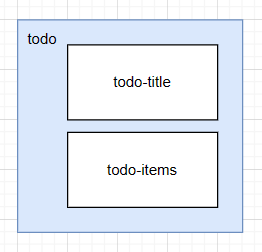
准备制作一个待办事项组件(todo) ,
该组件由待办标题(todo-title) 和待办内容(todo-items)组成,
但这三个组件又是相互独立的,该如何操作呢?
<!DOCTYPE html>
<html lang="en">
<head>
    <meta charset="UTF-8">
    <title>学习Vue的solt插槽</title>
</head>
<body>
<!--view层,模板-->
<div id="app">
    <todo></todo>
</div>
<!--1.导入Vue.js-->
<script src="https://cdn.jsdelivr.net/npm/vue@2.5.21/dist/vue.min.js"></script>
<script type="text/javascript">
    Vue.component('todo',{
        template: '<div>\<' +
            'div>待办事项</div>\<' +
            'ul>\<' +
            'li>学习VUE吧</li>\<' +
            '/ul>\<' +
            '/div>'
    });
    var mv = new Vue({
        el: '#app',
    });
</script>
</body>
</html>
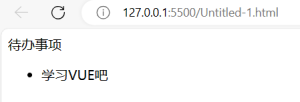
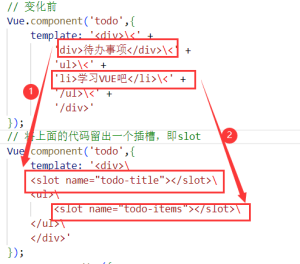
我们需要让,代办事项的标题和内容实现动态绑定,怎么做呢?我们可以留一个插槽!
将上面的代码留出一个插槽,即slot
Vue.component('todo',{
        template: '<div>\
        <slot name="todo-title"></slot>\
        <ul>\
            <slot name="todo-items"></slot>\
        </ul>\
        </div>'
});
接下来:定义一个名为todo-title的待办标题组件 和 todo-items的待办内容组件并实例化数据。
定义todo-title的待办标题组件
Vue.component('todo-title',{
        props:['title'],
        template: '<div>{{title}}</div>'
});
定义todo-items的待办内容组件
// 这里的index,就是数组的下标,使用for循环遍历的时候,可以循环出来!
Vue.component('todo-items',{
        props: ['item','index'],
        template: '<li>{{index+1}},{{item}}</li>'
});
实例化数据
var mv = new Vue({
        el: '#app',
        data: {
            title: 'VUE',
            todoItems: ['VUE2','VUE3','JS','TS']
        }
});
将这些值,通过插槽插入
<div id="app">
    <todo>
        <todo-title slot="todo-title" :title="title"></todo-title>
        <todo-items slot="todo-items" v-for="(item, index) in todoItems" :item="item" :index="index"></todo-items>
    </todo>
</div>
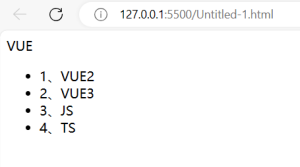
说明:我们的todo-title和todo-items组件分别被分发到了todo组件的todo-title和todo-items插槽中。
完整代码如下:
<!DOCTYPE html>
<html lang="en">
<head>
<meta charset="UTF-8">
<title>学习Vue的solt插槽</title>
</head>
<body>
<!--view层,模板-->
<div id="app">
<todo>
    <todo-title slot="todo-title" :title="title"></todo-title>
    <todo-items slot="todo-items" v-for="(item, index) in todoItems" :item="item" :index="index"></todo-items>
</todo>
</div>
<!--1.导入Vue.js-->
<script src="https://cdn.jsdelivr.net/npm/vue@2.5.21/dist/vue.min.js"></script>
<script type="text/javascript">
// 变化前
// Vue.component('todo',{
//     template: '<div>\<' +
//         'div>待办事项</div>\<' +
//         'ul>\<' +
//         'li>学习VUE吧</li>\<' +
//         '/ul>\<' +
//         '/div>'
// });
// 将上面的代码留出一个插槽,即slot
  Vue.component('todo',{
      template: '<div>\
        <slot name="todo-title"></slot>\
        <ul>\
          <slot name="todo-items"></slot>\
        </ul>\
      </div>'
  });
  Vue.component('todo-title',{
    props:['title'],
    template: '<div>{{title}}</div>'
  });
// 这里的index,就是数组的下标,使用for循环遍历的时候,可以循环出来!
  Vue.component('todo-items',{
    props: ['item','index'],
    template: '<li>{{index+1}}、{{item}}</li>'
  });
  var mv = new Vue({
    el: '#app',
    data: {
      title: 'VUE',
      todoItems: ['VUE2','VUE3','JS','TS']
    }
  });
</script>
</body>
</html>
评论(0)
暂无评论